
Nametag Formats
How to customize global, group, and individual formats.
Customizing nametag formats
There are multiple ways to customize nametag formats. All nametag formats can be customized with the /nametags format command, as well as the GUI editor, while the global format (and Bedrock global format) can additionally be edited in config.yml.
Types of nametag formats
CustomPlayerNametags checks for a format in this order, and uses the first one it finds:
- Individual — A format set for one specific player.
- Group — A format set for an entire LuckPerms permission group with
/nametags format groups. Requires LuckPerms to be installed. If a player is in multiple groups, the highest-weighted group that has a format set is used. - Global — The default format used for anyone without an individual or group format.
Without PlaceholderAPI installed, only individual formats apply. Global and group formats are ignored and every other player's nametag falls back to just their username.
Bedrock-specific formats
Each format type above can optionally have a separate Bedrock version. See Configuration for details on setting these up.
The {player} placeholder
{player} is built into CustomPlayerNametags and returns the player's username. It is the default global format, and it works even when PlaceholderAPI isn't installed.
Placeholders
Any PlaceholderAPI placeholder can be used in a nametag format string. A couple of common examples:
%player_name%          the player's username
%luckperms_prefix%     the player's LuckPerms prefix
%essentials_nickname% the player's Essentials nicknameMake sure to install any PlaceholderAPI expansions for the plugins you want to use placeholders from. For example, if you want to use %luckperms_prefix%, make sure the LuckPerms expansion is installed and enabled in PlaceholderAPI.
See the PlaceholderAPI placeholder guide for in-depth info on using them. In an individual format on a server without PlaceholderAPI, %placeholders% are left as literal text rather than being resolved.
CustomPlayerNametags placeholders
CustomPlayerNametags also registers its own PlaceholderAPI expansion placeholders, allowing other plugins that support PlaceholderAPI to utilize the same format without needing to duplicate it.
| Placeholder | Returns |
|---|---|
%customplayernametags_format% | The format currently in effect for the requesting player. |
%customplayernametags_format_global% | The global nametag-format from config.yml. |
One use case for these placeholders is with another AFXPlugins plugin, CustomAdvancementMessages. By using one of these placeholders in the CustomAdvancementMessages player-name-format config option, you can reuse the same format across both plugins without needing to duplicate it.
Multiple lines
Put \n anywhere in a format to start a new line:
%luckperms_prefix%&e%essentials_nickname%\n&6(&b%player_name%&6)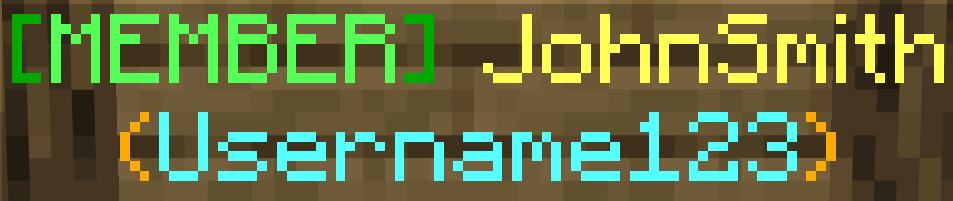
This works with global, group, and individual nametag formats, and there is no limit to the number of lines you can create.
Line length
Each line of a nametag is limited by nametag-line-max-characters (24 by default). Once past that limit, it will drop the text that is past it and appened ... to the end of the line. See Format Length for the settings and Permissions for per-player limits.
Color and style codes
Key for all Minecraft '&' color and style codes:
| Code | Color |
|---|---|
&0 | black |
&1 | dark blue |
&2 | dark green |
&3 | dark aqua |
&4 | dark red |
&5 | dark purple |
&6 | gold |
&7 | gray |
&8 | dark gray |
&9 | blue |
&a | green |
&b | aqua |
&c | red |
&d | light purple |
&e | yellow |
&f | white |
| Code | Style |
|---|---|
&k | obfuscated |
&l | bold |
&o | italic |
&n | underline |
&m | |
&r | reset color and styles |
Hex colors
Use &#RRGGBB for any exact color, for example &#FF8800.
MiniMessage support
Supports using any MiniMessage tags such as <red>, <rainbow>, <gradient:red:blue>, and <bold>.
Nametag menu
/nametag — Opens an inventory GUI menu that allows players to manage different nametag options.
| Menu option | What it does |
|---|---|
| Edit Nametag | Opens the editor GUI. |
| View | Shows the player's parsed current nametag format. |
| Toggle | Hides or shows other players' nametags for that player. The choice is remembered between sessions. |
Nametag editor
The nametag editor is an inventory-based GUI that allows easy customization of the nametag format by adding different items. Players can only edit items inside of widgets, while all other items outside of widgets are read-only. Placeholders that can be added to a format are managed with /nametags editor placeholders.
Item types:
| Item | Description |
|---|---|
| Color | MiniMessage color code. |
| Placeholder | PlaceholderAPI placeholders that have been added with the command, plus a built-in username ({player}) button. |
| Text | Text entered with a sign GUI. |
Admin nametag editor
/nametags editor — The same as the regular nametag editor gui, except it allows selecting which format will be edited (player, global, or group). It has two additional format items:
| Item | Description |
|---|---|
| New Line | Adds a new line to the nametag. |
| Widget | Stores items inside and allows players to customize their nametag. Players can add, edit, reorder, and remove all items inside of a widget. Inside, any number of items can be added, but the admin can specify a max-character limit and what items are allowed inside. An admin can also configure it with default items, or leave it empty. |
Widgets
A widget is a part of a format that players are allowed to fill in themselves from the nametag menu.
Writing a widget by hand
It is recommended to create and edit widgets in the admin editor, but they can also be written directly in nametag-format in config.yml or in a /nametags format command:
{widget colors=true placeholders=false text=true limit=16}Pizza{/widget} &a{player}The text between the tags is the widget's default content. The options go inside the opening tag:
| Option | Meaning |
|---|---|
colors | true or false — whether players may add color items. |
placeholders | true or false — whether players may add placeholder items. |
text | true or false — whether players may add text items. |
limit | Character limit for the widget. Text a player types in is limited to this length, and the widget's content is cut off at it (ending in ... if nametag-widget-truncate-indicator is on). Leave it as default for no limit. |
id | Identifies the widget so a player's saved contents stay attached to it. It is added for you, so don't write or change them manually. |
Widgets cannot be nested, and every {widget} tag needs a closing {/widget}. If a format has broken widget syntax, the plugin logs a warning, falls back to the default {player} for that format, and sends you a notice when you run /nametags reload. A line that contains only an empty widget is left out of the nametag rather than leaving a blank gap.
Nametag refreshing
Nametags automatically refresh for every online player, so placeholders that change over time stay up to date. The interval defaults to 20 ticks and can be changed with nametag-format-placeholder-refresh-interval-ticks in config.yml, or turned off with enable-nametag-format-placeholder-refresh.